Turn one photo into dozens of variations
AI-powered product images without Photoshop. Different variations also unlock cheaper shipping rates on Meesho.
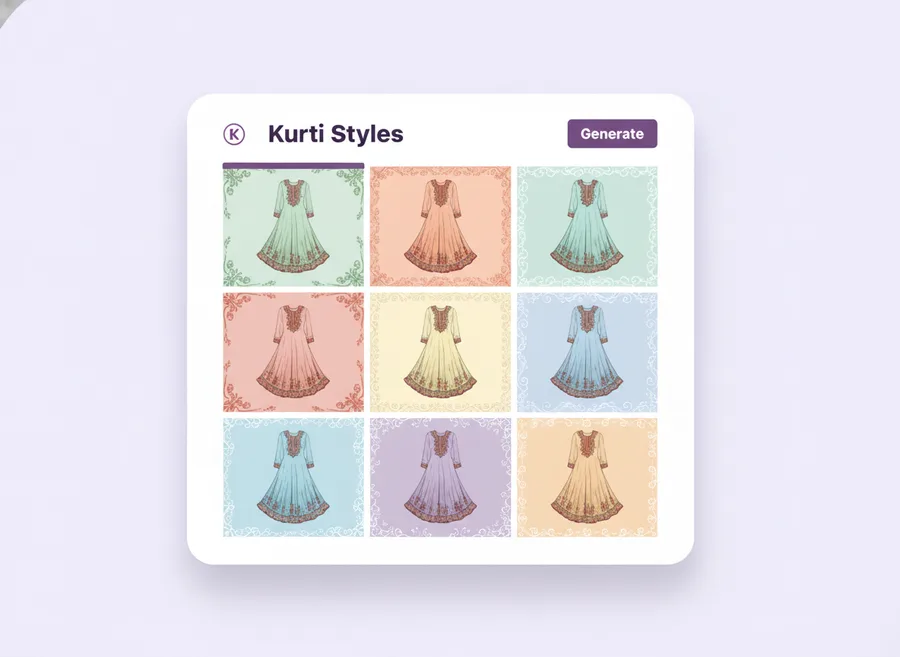
What it does
The AI Image Creator lives inside your supplier.meesho.com tab. You pick a source image from your catalog, choose a style preset, and the extension sends the image to our AI backend for processing. You get back multiple variations you can preview, keep, or regenerate individually.
Every variation is tuned to Meesho catalog norms: clean background options, consistent padding, and borders/stickers that attract buyer clicks without breaking Meesho's image guidelines.
What you can generate
- Background replacements — solid color, subtle gradient, or themed scenes.
- Borders — 8 pattern types (solid, checkerboard, stripes, dots, brick, noise) with randomized two-color palettes.
- Stickers & badges — "New", "Best Seller", "Sale %" badges that respect your catalog language.
- Hue shifts & lighting — subtle color grading to differentiate listings and avoid duplicate-image flags.
- Padding & crop — Meesho-safe composition so nothing important gets cropped in listing thumbnails.
How it works
- Open a product on supplier.meesho.com.
- Click Create with AI in the Extension panel.
- Select a style preset and the number of variations.
- The extension uploads the source to our AI backend; progress is shown live.
- Preview results, keep the ones you like, and regenerate the rest with one click.
Why it matters for Meesho
Meesho's catalog ranking rewards sellers who ship fresh, distinctive product imagery. Copy-pasted supplier photos hurt your visibility. With this Meesho image generator, every listing can have a clean, on-brand photo in minutes instead of hours. For the exact rules each output follows, see our Meesho image guidelines for 2026, and if you want better source shots to start from, our budget photography setup guide walks through a ₹5,000 kit.
Meesho image generator vs. manual editing
Most sellers reach for Photoshop, Canva, or a freelancer. Here is how an AI Meesho image generator compares for everyday catalog work:
| Task | Manual (Photoshop / Canva / freelancer) | Meesho Image Generator |
|---|---|---|
| Time per SKU | 10–30 minutes | 15–40 seconds |
| Skill needed | Design knowledge or paid help | None — pick a preset |
| Cost per image | ₹20–₹150 (freelancer) or a monthly design subscription | 1 credit (free trial credits to start) |
| Meesho-safe sizing | You set it manually | Automatic 2000×2000, <600 KB, policy-checked |
| Duplicate-image risk | High when reusing supplier photos | Lowered via hue/background variation |
| Where it runs | Separate app, then re-upload | Inside supplier.meesho.com, upload in one click |
Product categories it works best for
The generator is category-aware, so the same source photo produces appropriate variations whether you sell:
- Apparel & sarees — clean studio backgrounds and festival-themed scenes without a reshoot.
- Jewellery & accessories — solid or gradient backgrounds that make small products pop in thumbnails.
- Home, kitchen & décor — white-background shots generated from raw smartphone photos.
- Beauty & personal care — consistent padding and lighting across a full product range.
- Electronics & gadgets — distinct borders and badges that survive Meesho's thumbnail crop.
Is there a Meesho image generator app or APK?
No — and this is deliberate. There is no Android APK or mobile app. The Meesho image generator is a desktop Chrome extension that lives inside supplier.meesho.com, because nearly all sellers manage their catalog from a laptop or desktop where bulk editing and uploading is practical. If you found this page searching for a "meesho image generator apk", install the free Chrome extension instead — it does everything an app would, without leaving your Meesho tab.
Credits & pricing
One credit per AI image generated. (Shipping scans and applied rates also consume one credit each — see Shipping Scanner.) Credits are purchased as part of a plan via Razorpay. See pricing for details.
Who uses it
- Apparel sellers launching a new seasonal collection: generate 5 variants per SKU in an afternoon instead of scheduling a photo shoot.
- Resellers moving supplier inventory: differentiate copied supplier imagery with hue shifts and background swaps to beat duplicate-image flags.
- Home and kitchen sellers: produce clean white-background shots from raw smartphone photos taken at home.
- Multi-region sellers: generate festival-themed variants (Diwali, Eid, Onam) of the same product without reshoots.
What it is not
The AI Image Creator does not generate the product itself from a text prompt. Text-to-image for product photography tends to produce small inaccuracies (wrong count of buttons, distorted patterns) that drive returns. You always start with a real photo of your real product, and AI enhances — background, padding, borders, hue — around that truthful source.
Output quality and what Meesho accepts
All generated images are 2000 × 2000 px JPG, 85% quality, under 600 KB. Backgrounds and borders stay within Meesho's image policy — no watermarks, no price overlays, no collages. See our Meesho image guidelines for the full ruleset we follow.
Frequently asked questions
How long does each image take?
Typical generation time is 15–40 seconds per image, depending on the preset. A batch of 25 variants usually finishes in under 2 minutes.
Can I re-generate a single variant without redoing the whole batch?
Yes. Each variant has its own regenerate button. You only consume 1 credit per regeneration.
Do generated images get flagged as AI on Meesho?
Meesho does not prohibit AI-enhanced backgrounds as long as the product itself is a real photograph. Our presets stay on the safe side of that line.
What if I don't like any of the variants?
Regenerate individual variants, or switch presets and try again. Credits are only charged for generated images, not for failed attempts or errors.